01
Plan your day.
Choose the calendars you want to see. Bring your upcoming appointments into one clear view.
YOUR CALENDAR, CONNECTED

YOUR DAY, CONNECTED.
Your calendar knows where.
CalHop helps you work out when.
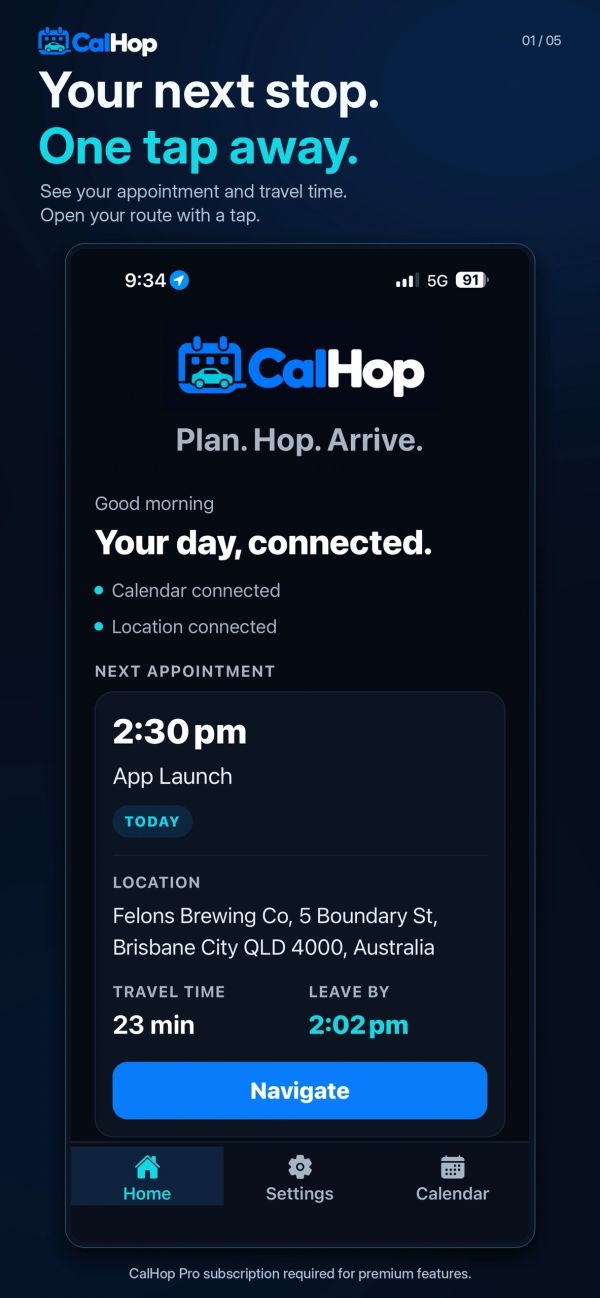
Turn your appointments into a plan for the journey. See travel times, know when to leave and open directions in the maps app you love.
For iPhone & Android • Five free smart trips to get started
Your journey. Your choice.
Where installed and available.
THE SPACE BETWEEN PLANS
Meetings. Catch-ups. Places to be.
CalHop connects the dots between your calendar and your next destination.
Choose the calendars you want to see. Bring your upcoming appointments into one clear view.
YOUR CALENDAR, CONNECTEDSee estimated travel times and set an arrival buffer. Add leave-by reminders with CalHop Pro.
A LITTLE BREATHING ROOMOpen directions in Apple Maps, Google Maps or Waze. One tap from your appointment to your route.
YOUR FAVOURITE MAPS APPTAKE A LOOK INSIDE
Less switching between apps.
More of your day in one place.
MADE FOR DAYS LIKE YOURS
Client meetings, site visits and a calendar that doesn't sit still. Keep the next destination within reach.
Appointments, lunch with friends and everything in between. Spend less time copying addresses.
Set your own arrival buffer. Make room for parking, walking in and taking a breath before you arrive.
LESS GUESSWORK. MORE GOING.
Try five free smart trips. Explore ongoing premium features with CalHop Pro.
Current subscription options are shown in the app.
Travel times are estimates and can change with traffic and conditions.
CalHop brings your calendar appointments and travel planning together. It uses appointment locations to estimate travel times, helps you plan when to leave and opens directions in your chosen navigation app.
Open Calendar, choose Add another account, and select Google, Microsoft Outlook/Microsoft 365 or a compatible CalDAV provider. Sign in and choose the calendars to include. On iPhone and iPad, the Apple / iCloud option can also use calendars already synced to your device with your permission.
CalHop can open directions in Apple Maps, Google Maps or Waze. Choose your preferred app in Settings and make sure it is installed and available on your device.
Time-to-leave reminders require CalHop Pro. Turn them on in Settings, allow location and notification permissions, and set an arrival buffer. Travel times and reminders are estimates, not a guarantee of arrival time.
Reopen CalHop after changing an appointment so it can refresh the travel information and scheduled reminder. Calendar information refreshes while the app is active and when you return to Home.
CalHop includes five free smart trips to try its travel-planning features. Open Settings and choose Upgrade to Pro to see current subscription options for ongoing premium access.